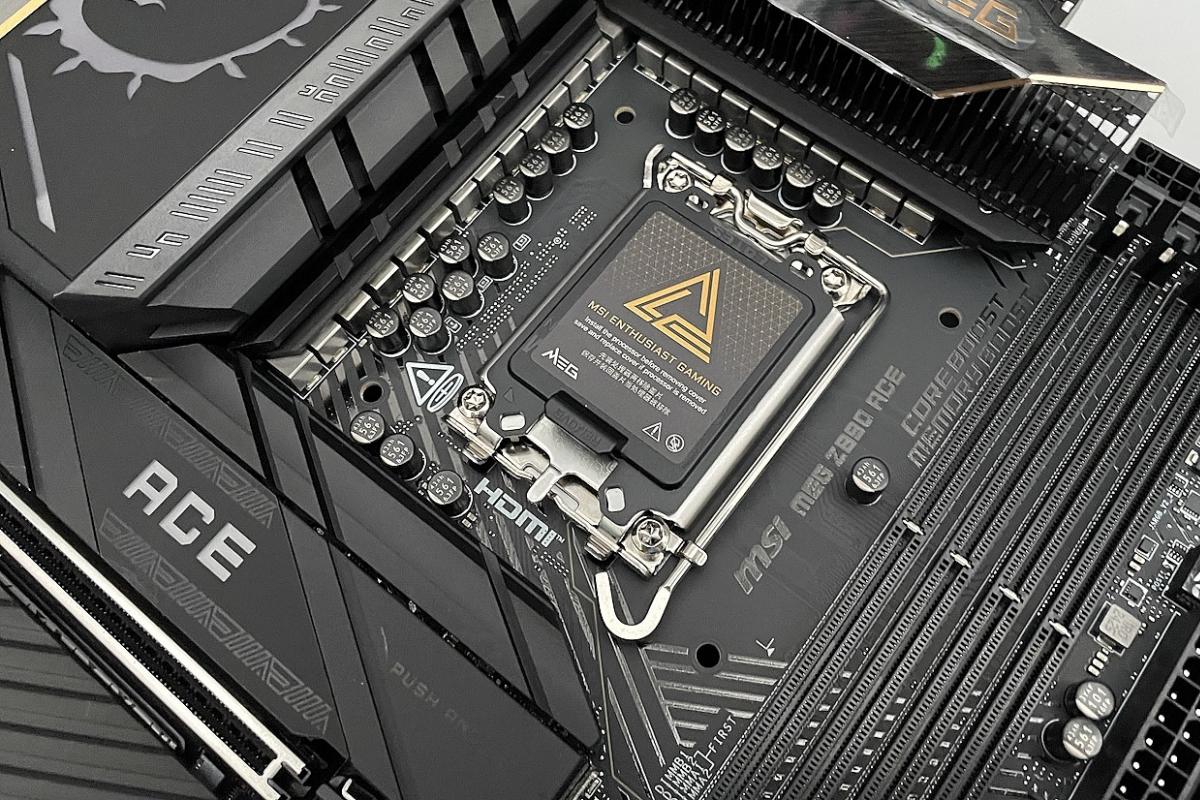
If you're embarking on the adventure of building your first computer yourself, it's normal to feel a bit lost with all the acronyms and technical specifications. And rightly so; the motherboard is essentially the heart of your system , as it's the component that allows the processor, graphics card, and the rest of the components to communicate seamlessly.
You don't need to be an engineer to choose the right one, but it's helpful to know where to look so you don't waste money or buy something that's incompatible with your CPU. Whether you're looking for a computer for hardcore gaming, design work, or simply something reliable for home use, understanding the nuances of Intel motherboards will save you a lot of headaches.
Understanding Chipsets: Which one to choose based on your use?
When you go into a store, you'll see that the motherboards are mainly divided by letters. It's not always necessary to go for the newest model, but it is key to move up a category according to your needs . If you're looking for something basic, the H series motherboards are sufficient, although if you want a balance between price and power, the B series is the safest bet for most people.
However, if you're someone who wants to squeeze every last drop of performance out of your motherboard or you're curious about overclocking, you should go straight for the Z series, the high-end range . These motherboards offer much better power management and the most advanced features, although they tend to cost a pretty penny. Remember that upgrading your motherboard isn't just about changing your CPU; it also allows you to add modern technologies like USB-C or better audio systems.
Sockets and Generations: LGA1700 vs LGA1851
This is where many people go wrong. Not all Intel motherboards are compatible with all processors. We currently have the LGA1700 socket , which powers the 13th and 14th generation Core processors, and the newer LGA1851 , designed for the powerful Intel Core Ultra 200 series. If you buy a motherboard from the 700 or 800 series, make sure the socket is an exact match for your processor.

One very important detail is the RAM. The big news is the massive leap to DDR5 memory , which is much faster. Interestingly, some 13th and 14th generation models still allow the use of DDR4 modules , which is a lifesaver if you're on a tight budget or already have quality RAM from your older PC.
Analysis of Featured Models and Recommendations
If you're looking for absolute excellence, models like the MSI MEG Z890 ACE are true beasts, boasting an enviable digital power system and a stunning aluminum design. On the other hand, if your profile is purely that of an overclocking enthusiast, the ASUS ROG MAXIMUS Z890 APEX is the perfect tool, optimizing the RAM signal by using only two DIMM slots.
For those who prefer a more balanced option without sacrificing power, the Gigabyte Z890 AORUS MASTER stands out for its striking design and the inclusion of a front HDMI connector, very useful for internal LCD screens. If space is an issue, there are options like the ASUS ROG STRIX B860-G in Micro-ATX form factor, which offers almost the same features as a full-size motherboard but in a much more manageable size.

For more reasonable budgets, the MSI MAG B860 TOMAHAWK WIFI is probably one of the smartest options on the market, as it maintains support for PCIe 5.0 and Wi-Fi 7 without costing a fortune. Similarly, the ASUS TUF GAMING B760M-BTF is ideal for those who hate cables, thanks to its rear port configuration that keeps the PC's aesthetics completely clean.
Technical Features You Should Watch Out For
Formats and Sizes
- ATX: The classic standard. It's the largest, offers more expansion slots, and is easier to cool. Ideal for mid-tower or full-tower cases.
- Micro-ATX: A very cost-effective middle ground. They are more compact and economical, but still maintain the ability to install four RAM modules.
- Mini-ITX: For lovers of ultra-compact PCs. They are expensive due to the miniaturization and are usually limited to two memory slots.
Storage and PCIe Slots
Today, the most advanced technology is PCI Express 5.0 . If you're going to buy a next-generation SSD, your motherboard needs to support it to achieve blazing-fast read and write speeds. Most decent motherboards have at least three M.2 slots , with the primary one communicating directly with the CPU to avoid bottlenecks.

Connectivity, Network and Sound
Don't settle for the basics. On a modern motherboard, you should demand at least 2.5 GbE Ethernet and, if possible, Wi-Fi 7 with a 320 MHz bandwidth for a wireless connection almost as stable as a wired one. As for audio, look for motherboards that separate the DAC and DSP to prevent electromagnetic noise from other components from affecting the sound from your headphones.
Finally, consider the USB ports. Thunderbolt 4 or USB 4 is essential if you work with large files or fast external devices. A well-balanced rear panel and a fast front USB-C port make a significant difference in any user's daily life.
To build a well-balanced system, the ideal is to combine a powerful processor with a motherboard that doesn't limit its capabilities, prioritizing socket compatibility and RAM speed. Whether you opt for the robustness of a Z890 for overclocking or the efficiency of a B860 for gaming, the key is that the hardware fits your budget and the size of your case, ensuring that connectivity and storage are ready for future standards.

Table of Contents