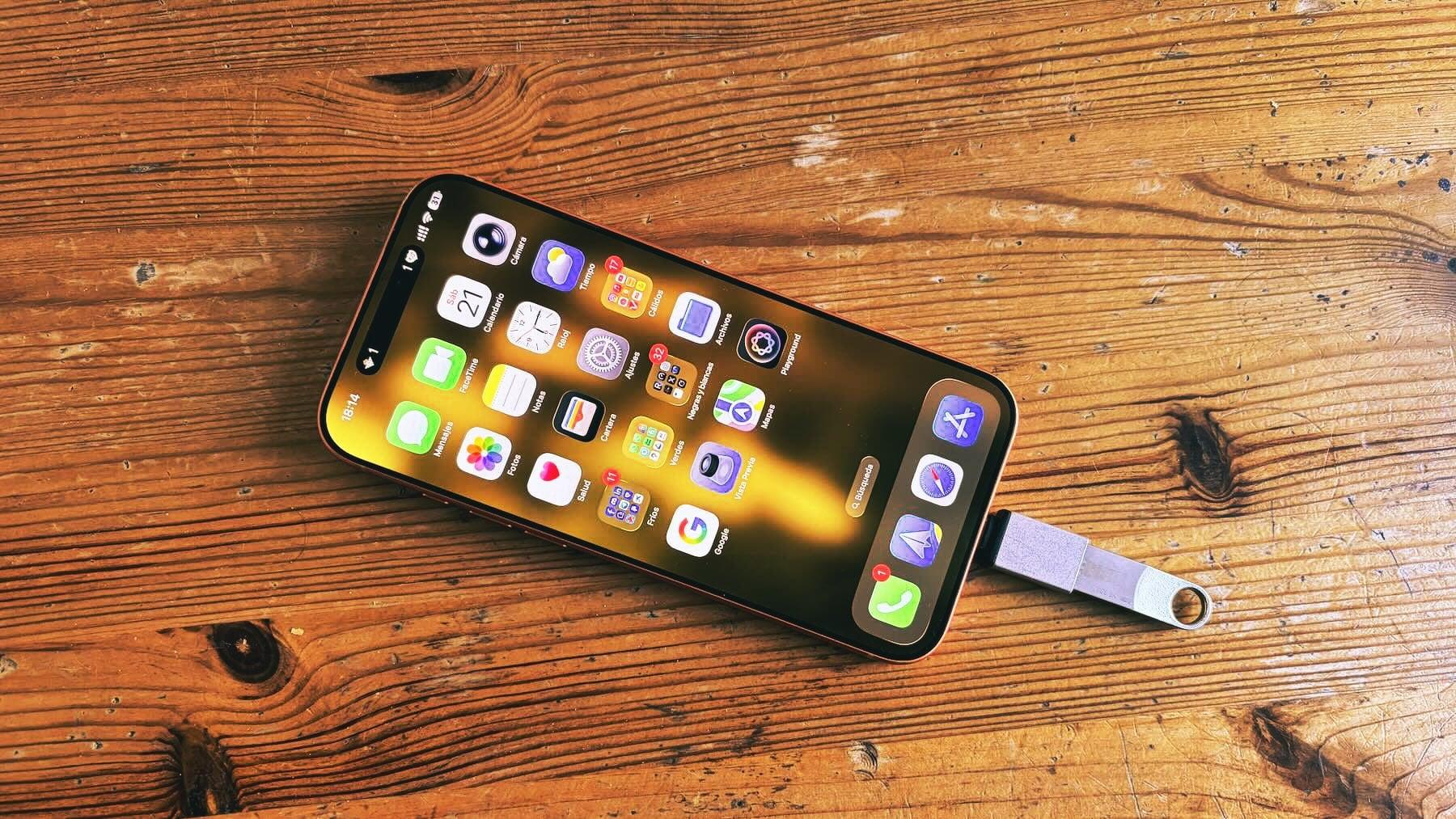
In just a few years, USB-C has become the connector that aims to do it all : charging phones and laptops, transferring files, outputting video, and even powering demanding accessories. We see it in ultralight laptops, portable consoles, tablets, phones, and even small professional devices. But despite this appearance of a single, simple standard, the reality is much more complex.
The problem is that, although all the connectors have the same shape, not all USB-C cables and ports offer the same performance . Speed, charging power, and extra features (such as high-speed video or data transfer) vary depending on the underlying standard. This leads many users in Spain and the rest of Europe to continue choosing cables and accessories based on appearance rather than actual functionality.
From the port jungle to USB-C: how we got here
In the mid-90s, any desktop PC was a veritable puzzle of different connectors : serial and parallel ports, PS/2 for keyboard and mouse, specific connectors for controllers, and so many others that we hardly remember today. Each peripheral came with its own strange cable, and it wasn't uncommon to plug it into the wrong port or run out of free slots.
To bring order to this chaos, a group of major manufacturers spearheaded the first USB standard. The idea was simple yet ambitious: a single connection system for most peripherals , with an affordable connector, capable of providing some power, and with automatic device detection without requiring a computer restart—a very advanced feature for the time.
Early versions of USB weren't known for their speed, but convenience and cost savings eventually prevailed. With the arrival of USB 2.0, external hard drives and digital cameras became incredibly popular, and gradually the USB port also began to be used for charging devices , even though it wasn't initially designed as a universal charger.
The next big leap was the arrival of the USB-C connector, which sealed the deal with its reversible design and its ability to combine data, fast charging, and video output in a single cable . On paper, it was every user's dream: a single type of port and cable for almost everything, from a mobile phone to an external monitor.
However, that dream came with a catch: the connector design was standardized, but the internal capabilities were not . To the user, two cables may appear identical, but offer very different figures in transfer speed, charging power, or high-resolution video compatibility.
The big USB-C mess: same shape, different features
This lack of clarity has led many people to continue buying USB-C accessories based solely on the plug, without considering what the cable or port actually supports. In practice, a cheap USB-C cable can limit a laptop's charging speed or slow down the copying of large files , even if it physically fits perfectly.
To mitigate this confusion, the organization that regulates the USB standard has recommended that manufacturers abandon misleading names like "SuperSpeed" and opt for more direct labels such as USB 20Gbps or USB 40Gbps . The goal is that, by reading the box or technical specifications, the user can get a clear idea of the maximum speed they will obtain.
Even so, the underlying problem remains: people continue to buy based on the connector's shape rather than its power and specifications . This is especially important when it comes to charging. The same USB-C cable might be perfect for a mobile phone but fall short when powering a laptop that needs tens of watts of sustained power.
For everyday use, it's important not to focus solely on gigabits per second and to also pay attention to the maximum charging power (in watts) that the cable and charger support . In a market where almost every modern device in Europe uses USB-C, the real enemy isn't the standard itself, but the ambiguity surrounding many products.
USB-C as a universal charger: power and convenience
The consolidation of USB-C as a widespread charging port has spurred a new generation of compact chargers capable of powering various types of devices . Compared to older, bulky, proprietary adapters, USB-C solutions with high power and small size have gained popularity, proving very convenient for those who frequently travel between home, work, and travel.
These chargers stand out because, despite their compact size, they can deliver higher power outputs than many traditional chargers . This allows them to power everything from mobile phones to ultralight laptops, powerful tablets, or even modern handheld consoles, provided the device is compatible with the appropriate fast-charging profiles.
The key lies in intelligent energy management. The most advanced models don't deliver maximum power indiscriminately , but rather adjust to what each device needs at any given time. This reduces heat generation, improves efficiency, and helps extend the lifespan of both the charger and the device's battery.
For users in Spain and the rest of Europe, where working with a laptop away from home or using multiple mobile devices is increasingly common, having a single, high-quality USB-C charger saves space, weight, and power outlets . Compared to generic, low-quality adapters that often overheat or fail over time, well-designed models offer a more worry-free experience: plug them in and forget about them.
One thing to keep in mind is that in many offers and promotions, power, safety standards, and actual compatibility with different devices are just as important as price. A good USB-C charger can last you for years, while a mediocre one can become a constant source of problems.
USB-C on mobile: from external storage to working with large files
The adoption of USB-C in mobile phones, including those sold in Europe due to EU regulations, has opened the door to uses that were unthinkable on a phone until recently. One of the most practical is connecting external storage devices directly to the phone to manage files like on a computer.
On modern smartphones, all you need is a USB-C port and a small adapter to plug in a flash drive or external hard drive and work with documents, photos, or videos . Once you get used to it, the process is very similar to what you would do on a PC or Mac: the system detects the drive and displays it in its file manager.
Most flash drives still use the classic USB-A connector, so a simple USB-A female to USB-C male adapter is needed . This small accessory, which can be easily found in European online and physical stores, acts as a bridge between the flash drive and the USB-C port of the phone or tablet.
Once connected, the operating system identifies the external drive in seconds. Thanks to the integrated file management application, users can browse folders, copy documents, view photos, play videos, or move content between internal and external storage , whether to free up space or to work on large projects outside the cloud.
In practice, this method is especially useful for those who handle large volumes of photos, videos, or professional documents . It doesn't require an internet connection, doesn't rely on cloud services, and uses small, inexpensive accessories that fit in any backpack. However, it's worth noting that not all file system formats are compatible and some external hard drives may require additional power.
Ultra-compact USB-C flash drives: more capacity in less space
Another area where USB-C is changing the game is in external storage. In contrast to the classic bulky USB-A flash drives, extremely small USB-C flash drives have appeared, designed to fit almost permanently inside the device without protruding much.
These drives combine a minimal size with capacities that, just a few years ago, were reserved for much larger external hard drives. Models with up to 1 TB of storage in a tiny body allow you to expand the memory of modern laptops and tablets without having to carry around extra enclosures or long cables.
In terms of performance, these USB-C drives offer read speeds high enough to move large files, multimedia projects, and complete backups . Some versions reach speeds close to 400 MB/s in the higher capacities, while entry-level models fall slightly short but are still more than sufficient for everyday use.
In addition to pure speed, many of these drives include compatibility with backup and management applications for Windows and macOS . Thanks to these tools, it's possible to automate backups, organize content, and easily restore data—something especially useful for students, creative professionals, or frequent travelers.
The philosophy behind these drives is clear: to offer always-available storage without relying exclusively on the cloud or bulky hard drives that need to be constantly connected and disconnected. In the European market, where ultra-thin USB-C laptops and tablets have become essential tools for work and study, these drives fit perfectly with a mobile lifestyle.
In Latin American markets, we're already seeing concrete launches of these high-capacity, ultra-small USB-C flash drives, and it's expected that equivalent or similar versions will continue to gain traction in Europe through established distributors . Their combination of discreet design, high performance, and compatibility with modern devices makes them a natural complement to current laptops and tablets.
USB-C Docks: Turn consoles and devices into connection hubs
Beyond mobile phones and computers, USB-C has also made its way into the world of handheld consoles and mini PCs. This is where docks come in, small accessories that multiply the available ports from a single USB-C connection and allow you to create true workstations or gaming setups on the go.
These docks typically combine various USB ports, HDMI outputs for monitors or televisions, and Ethernet connectivity for a more stable network than Wi-Fi. Designed for consoles like the Steam Deck or similar models from other manufacturers, many also include a physical base to support the device while using it like a desktop console.
One of the key features of these accessories is the presence of a USB-C port with high-power Power Delivery charging, often around 100W . This port is used to power both the dock and the connected device, so the console, laptop, or mini PC receives power while being used with external peripherals.
In terms of video, most modern docks offer HDMI output capable of handling resolutions up to 4K at 60Hz , sufficient for comfortably working with current monitors or enjoying games and multimedia content on living room TVs. They also typically include several high-speed USB-A ports, with speeds up to 5Gbps, ideal for keyboards, mice, external hard drives, or additional controllers.
Network connectivity via a standard Ethernet port, supporting speeds up to 1 Gbps, allows you to download games, update systems, or play online with a stability that Wi-Fi doesn't always guarantee . In practical tests, it's not uncommon to see speeds approaching the theoretical maximum for this type of connection when the fiber optic connection allows it.
For European users who have adopted portable consoles based on PC hardware, as well as compact mini desktop computers, these USB-C docks offer a simple and relatively inexpensive way to expand ports without having to change equipment . They are usually small, reasonably priced, and widely compatible with different systems, including USB-C mobile phones and, in many cases, hybrid consoles available on the European market.
USB-C in professional solutions: beyond the home user
The advancement of USB-C isn't limited to the average user. In the professional sphere, devices have emerged that rely on this connector to simplify installations and reduce setup times . A clear example is lighting controllers and advanced-function equipment that, until recently, required dedicated networks or bulky hardware.
Some manufacturers have opted for small USB key-type devices that, when connected via USB-C to a computer with the appropriate software , unlock a large number of control parameters for environments such as clubs, theaters, television studios or architectural installations.
This approach is based on a plug-and-play philosophy: connect and start working without complex configurations . The device is powered through its own USB-C port and offers one or more dedicated outputs (such as DMX in the case of professional lighting) to control external equipment from the computer.
In larger projects, such as museums, theme parks, or stadiums, these USB-C adapters allow designers and integrators to reduce the amount of hardware required, simplify cabling, and facilitate rack or flypack mounting . Physical details like anti-slip strips or screw guides help secure the equipment in stable positions within mobile or permanent installations.
Alongside these advanced models, simpler and more affordable versions are also available, designed as an entry point to professional lighting control and other technical systems. They follow the same logic: they connect via USB-C, are powered through that port, and use the computer as the central hub thanks to specialized software.
These types of solutions fit well in the European context, where the entertainment industry, corporate events, and cultural venues increasingly demand compact, easily transportable equipment based on widely supported standards such as USB-C . Thus, the same connector used to charge a laptop at home becomes the foundation of complex professional systems.
Today, the USB-C ecosystem encompasses everything from the charger you carry in your backpack to tiny flash drives for expanding your devices, docks that transform a console into a multimedia center, and professional solutions that control theater lighting. The great advantage of this connector is its versatility, but it also requires thorough research into power, speeds, and compatibility to avoid surprises. Understanding what lies behind each cable and each port has become as important as choosing the right device.
Table of Contents
- 1 From the port jungle to USB-C: how we got here
- 2 The big USB-C mess: same shape, different features
- 3 USB-C as a universal charger: power and convenience
- 4 USB-C on mobile: from external storage to working with large files
- 5 Ultra-compact USB-C flash drives: more capacity in less space
- 6 USB-C Docks: Turn consoles and devices into connection hubs
- 7 USB-C in professional solutions: beyond the home user