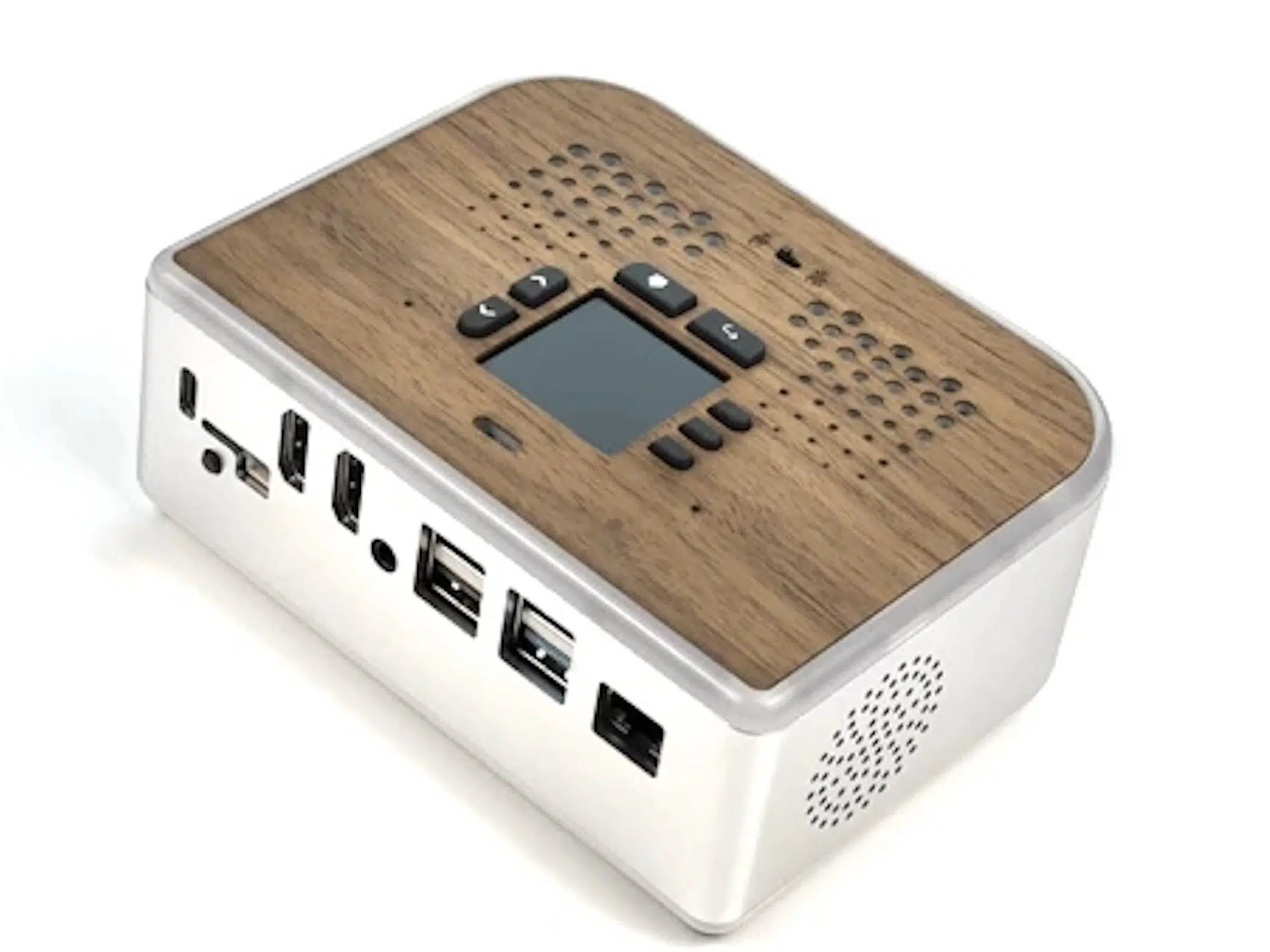
In a landscape dominated by closed smart speakers, a game-changing alternative has emerged: an open-source AI assistant designed for those who want to understand and control what's happening under the hood. Ubo Pod fills that gap, a device that combines a Raspberry Pi 4 or 5, voice, computer vision, and sensors , all in a modular and repairable enclosure that doesn't rely on proprietary services to function.
The proposal goes far beyond requesting music or the weather. Ubo Pod integrates microphones, speakers, a screen, a camera, sensors, and even an infrared emitter and receiver to communicate with language models, recognize what it sees, and, incidentally, control your TV or any compatible device. You can choose between cloud-based or fully local AI to prioritize privacy, and if you feel like experimenting, it offers a perfect environment to develop your own experiences with voice, vision, and tools.
What is Ubo Pod and what does it aim for?
The Developer Edition (DE) is the heart of the project. Its mission is to replace "black boxes" like Amazon Echo or Google Nest with open hardware and free software , without being tied to a specific platform. Thus, the same team enables speech-to-text recognition, text-to-speech synthesis, language and vision models (LLMs/VLMs), tool calling, and various activation mechanisms.
Ubo Pod isn't just designed to be hackable; it also aims to be user-friendly for those who don't want to code. It includes a graphical interface embedded in its small screen and a WebUI for configuring it without writing any code . This allows users to select AI services, adjust options, and activate features directly from the device or a web browser, offering a practical and straightforward approach.
The open philosophy is evident throughout the design. Both the software and hardware are open-source, with public repositories for the Ubo app code and the boards and mechanical files . If you wish to audit, modify, or contribute, you have access to the complete system schematic, something unusual in this type of consumer assistant.
Design and hardware: modular, expandable and repairable
The Ubo Pod's chassis is compact and built to last. It measures 130 x 99 x 52 mm and weighs approximately 340 grams , with an interior designed for the Raspberry Pi 4 or Raspberry Pi 5 and active thermal management to help maintain stable performance. The modular casing makes it easy to replace components, expand the system, and, if necessary, repair it without any hassle.
The front features a 1,54-inch color IPS display with 240 x 240 pixels. Although small, the screen displays status, menus, and an embedded interface for configuring and accessing information on the fly. Next to it, an integrated 5 MP camera provides computer vision. The Ubo Pro 4 variant also supports the use of the official Raspberry Pi V1 and V2 camera modules, while the Ubo Pro 5 also supports the Raspberry Pi Camera Module 3, expanding the viewing capabilities.
The audio system is well-equipped for natural conversations. It features dual stereo microphones with audio capture up to 48 kHz , and stereo speakers with playback up to 48 kHz and very low distortion (<0,1% THD). The documentation mentions 1 W per channel, while another description refers to 2 W per speaker; in either case, the system is geared towards clear voice and interaction at a desk or in a living room. For external use, it includes a line output (WM8960) with 40 mW into 16 Ω, jack insertion detection, -75 dB THD at 20 mW, and a 90 dB SNR with a 16 Ω load.
For physical interaction, the unit includes a keyboard with seven soft-touch silicone buttons and a dedicated power button. It also features an LED ring with 27 addressable RGB diodes (SK6812), compatible with NeoPixel , perfect for visual cues, statuses, or effects.
In terms of connectivity, it inherits the best features of the Raspberry Pi. It has Gigabit Ethernet, WiFi 5, Bluetooth 5.0, two USB 3.0 ports, and two USB 2.0 ports on the SBC, so you won't be lacking ports for adding peripherals or speeding up workflows.
One of its key features for home use is infrared control. It integrates an IR receiver with a range of up to 5 meters (TSOP75238) and four high-power, high-speed 940nm IR emitters (VSMB10940) with an omnidirectional pattern. This allows you to control televisions, soundbars, or other devices that accept IR commands, either by forwarding signals from a universal remote or by voice command.
The sensor array is also comprehensive. It includes a PCT2075 temperature sensor (accuracy ±1 °C between -25 °C and +100 °C) and a VEML7700 ambient light sensor , capable of measuring from 0 to 120 kilolux with a fine resolution of 0,0036 lx/ct. This environmental data can be integrated into automations or contextual assistant responses.
For storage, it comes standard with a 32GB microSD card pre-installed with the operating system. The Ubo Pro 5 version adds an M.2 PCIe slot for NVMe SSDs or for adding an AI accelerator , a worthwhile upgrade if you plan to run demanding local models or store large databases and memory files.
Real Privacy: Physical Curtain and Hardware Microphone Shutter
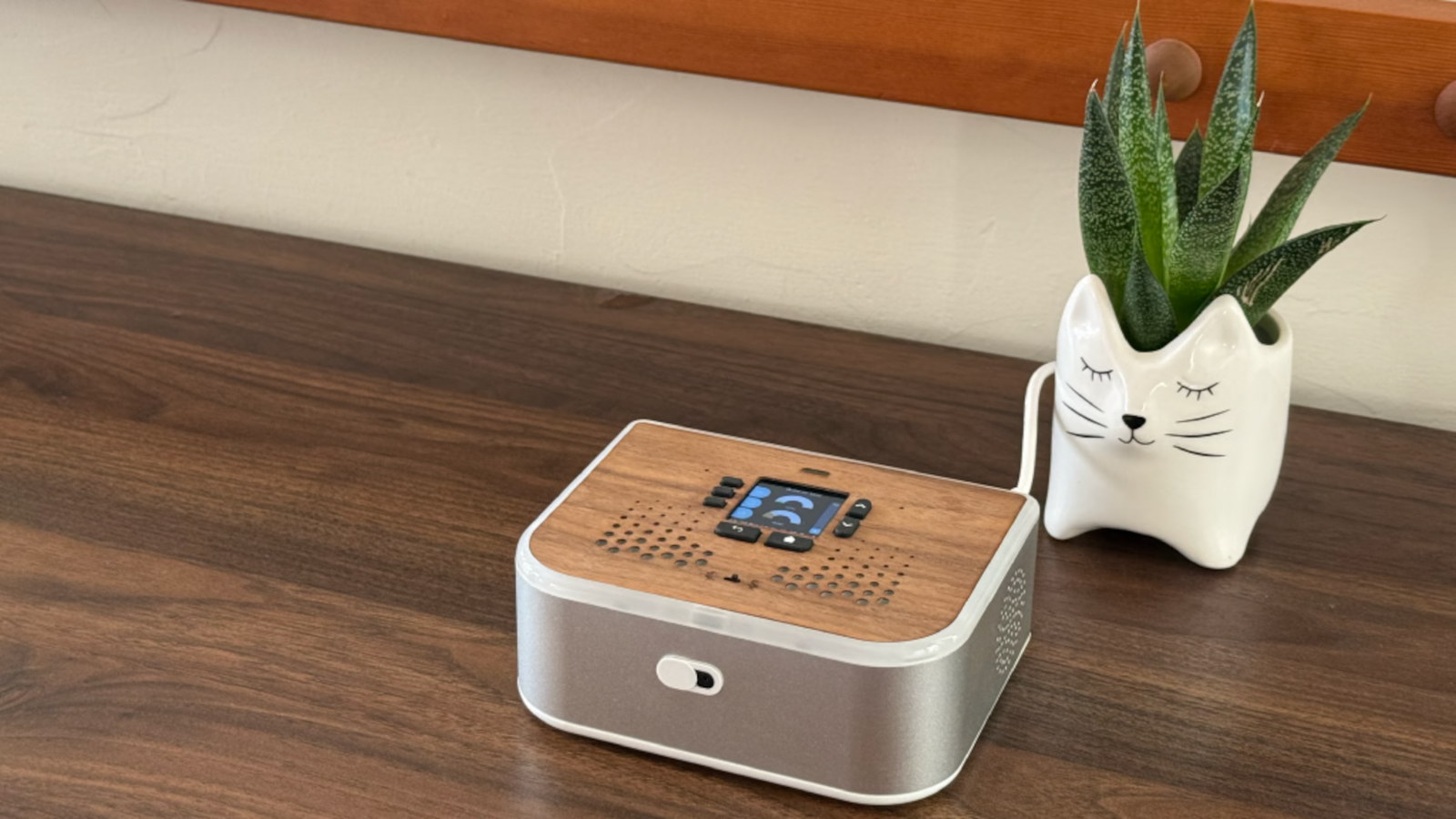
Beyond the rhetoric, privacy is materialized in physical elements. The camera can be blocked with a physical privacy curtain , so it's completely covered when you don't want to use it. The microphones, meanwhile, have a hardware kill switch, allowing you to mute them without relying solely on software.
This approach is complemented by the software architecture. Ubo Pod allows you to work with cloud services or entirely locally , maintaining control of your data and adjusting the balance between convenience and privacy as needed. If you want an assistant that doesn't upload audio or images to external servers, you can configure it so that everything happens on your network or on the device itself.
Open source software, no-code WebUI, and over 50 AI providers
Under the hood runs Raspberry Pi OS and the Ubo App, written in Python and published on GitHub. You don't need to buy the device to try the experience: the app can be installed on a Raspberry Pi 4 or 5 , so you can experiment with the software before committing to the full hardware.
Compatibility with AI providers is extensive. Ubo Pod supports over 50 services for speech recognition, speech synthesis, memory, vision, and language models . This list includes cloud-based and on-premises solutions, and you can select them from the integrated screen or via the web interface.
If you prefer to choose the models yourself, you can do that too. You can point to API addresses of popular models like Gemini, ChatGPT, or Claude , or use Ollama to run LLMs on your own hardware, which lowers latency and keeps your data within your network.
To develop extensions, there's a gRPC API designed to let you add capabilities in just a few lines of code. Practical examples include a voice note assistant (Memo) with memory and context, image generation from voice , image description using VLMs, and controlling the TV with the IR emitter using voice commands.
The interaction layer is completed with various ways to activate the assistant and with tool calling. Together, these offer a rich conversational flow that is not limited to text responses , but can execute actions, read sensors, display information on the screen, or illuminate the LED ring depending on the status.
Infrared vision and control: your home under your voice
The integrated camera and compatibility with official Raspberry Pi modules give the Ubo Pod a truly immersive device. The system can recognize codes, characters, gestures, and objects , opening the door to a wide range of use cases, from reading on-screen code and detecting confirmation gestures to describing scenes.
Universal infrared control is another key feature geared towards everyday life. You can "teach" it commands from your favorite remote so the assistant can reproduce them , or you can ask it to send signals directly to other devices (like the TV or air conditioner) using your voice. This type of integration makes an assistant immediately useful from day one.
Hassle-free user experience… and ready to tinker
Although it's a device for developers, it doesn't force you to be one. It's fully functional right out of the box, and you can simply configure it through its WebUI without writing a single line of code. From then on, you decide whether to stick with the basic experience or delve deeper and create your own apps, templates, or integrations.
Anyone who enjoys tinkering will find this the perfect playground. The modularity of the hardware and the open-source software make it easy to replace components, add M.2 storage to the Pro 5 , or try out AI accelerators. And if you're worried about breaking something, you can always stick with the stock setup: the customization potential is there whenever you're ready.
Models, key specifications and differences
The Ubo family is structured around variants that embrace Raspberry Pi 4 or Raspberry Pi 5. Ubo Pro 4 and Ubo Pro 5 share the base (1,54” 240×240 IPS screen, 5 MP camera, dual microphone and dual speaker, IR, sensors, LED ring, 7-button keyboard) , but differ in some important points.
In official cameras, Ubo Pro 4 supports the Raspberry Pi V1 and V2 modules , while Ubo Pro 5 adds compatibility with the Camera Module 3. The Pro 5 version takes another leap forward with the M.2 PCIe slot for NVMe SSDs or AI accelerators, ideal for fast storage or offloading computing from the processor when running local models.
Both share the same connectivity features as the SBC: Gigabit Ethernet, WiFi 5, Bluetooth 5.0, two USB 3.0 ports, and two USB 2.0 ports . For audio, in addition to the stereo speaker system and microphones, the WM8960 line-out jack with jack detection adds flexibility for external equipment. The package is completed with a 32GB microSD card pre-installed with the operating system.
Pricing, availability, and the reality of crowdfunding
The project reached the community through Kickstarter with a funding goal of $25.000. Rewards start at $109 for the Ubo Pro 4 and $129 for the Ubo Pro 5. It's important to note that neither version includes a Raspberry Pi in the box; you'll need to provide your own single-board computer (SBC). Shipping costs are also not included.
As with any crowdfunding campaign, it's important to be aware of the risks. One of the notices reminds backers that "supporting is not the same as buying" : backing a project doesn't guarantee delivery. Be prudent, review the information, and assess the risk before committing your money.
The official campaign page is: https://www.kickstarter.com/projects/ubopod/ubo-pod-hackable-personal-ai-assistant . The team encourages you to spread the word about the project and join if the technical proposal appeals to you.
Project status and message from the creator
The creator of the Ubo Pod has shared that, just two days after launching the campaign, it had already reached nearly 40% of its goal. He's asking for a little push to cross the finish line and thanks everyone for sharing the campaign , especially those with technical backgrounds who are enthusiastic about the concept.
There's an unusual aspect to this crowdfunding campaign: a small batch was manufactured in advance, and there's some inventory ready to ship immediately to the first backers . This decision reflects the years of work invested in the hardware and software, and the passion behind the project.
The creator's stated goal is clear: to empower developers to easily build interactive experiences using voice, vision, and sensors . He also expresses his frustration with devices from large corporations: closed systems, tied to services, and, in his opinion, disrespectful of consumer rights.
Regarding visibility, she's asking for suggestions on how to amplify her reach. She's aware of paid marketing agencies but has decided against that approach for now , opting instead for community and word-of-mouth marketing.
Setup and Workflow (without turning it into a tutorial)
Ubo Pod is designed to get you from zero to fully functional in no time. The web interface guides you through selecting AI providers (voice, text, vision, memory) and basic setup , while the integrated on-screen GUI allows for certain adjustments without needing to open a browser.
For those who want to evaluate before investing in the hardware, the Ubo App can be installed on a bare Raspberry Pi 4/5 . This allows you to check compatibility, explore the ecosystem, and assess which model best suits your needs, or if running it on your own board is sufficient.
In scenarios requiring strict privacy, you can opt for local or on-premises solutions , preventing audio and images from leaving your network. And if you're looking for power or specific third-party models, you have access to cloud providers and the option to target APIs from Gemini, ChatGPT, or Claude, among others.
Case studies and demos now available
Beyond theory, there are already working examples that show what it's capable of. Memo, the note-taking assistant, maintains memory and context in the conversation , making it ideal for capturing reminders or ideas without losing track.
In the visual section, you can generate images from a voice command and obtain image descriptions using vision-language models (VLMs). Accuracy and usefulness will depend on the providers and models you select, but the infrastructure is ready.
For the living room, IR control truly shines. It's perfectly feasible to tell the assistant to change the channel, adjust the volume, or turn off the TV , as long as the device receives infrared commands. Combined with ambient detection (temperature and light), you can create simple contextual behaviors.
Why choose an open assistant
Closed-end assistants offer convenience, but at the cost of control and flexibility. With Ubo Pod, you choose providers, decide where your data is processed, and can inspect the code . For many, this isn't a minor detail, but rather the difference between using a tool and being used by it.
Furthermore, the hardware isn't soldered onto a proprietary board from a single vendor. Using a Raspberry Pi allows you to upgrade, repair, or reuse components , which is especially valuable in a context of rapid technological obsolescence.
Limitations to consider
As with any open-source hardware project, there are important nuances. The rewards don't include the Raspberry Pi , so you'll need to factor in that cost and availability. Regarding audio, the documentation mentions 1W per channel and 2W per speaker; if maximum volume is crucial for you, consider your usage context (desktop or small room) or whether you'll be using the line output with external speakers.
On the other hand, it's an evolving project. The list of AI vendors, features, and local performance depend on the community, dependencies, and the Pi you build (4 or 5) . The good news is that, being open source, you can adapt and improve it over time.
Ubo Pod fits into a niche that increasingly demands more voice and more control: people who want a useful assistant with vision and sensors, but without sacrificing privacy or the ability to explore whenever they want. With modular hardware, open-source software, compatibility with over 50 AI providers, local options, and a code-free WebUI , the project puts a real alternative to the black boxes on the market in the hands of the community. If the idea appeals to you, the Kickstarter campaign—with prices starting at $109 for the Pro 4 and $129 for the Pro 5, not including the Raspberry Pi or shipping—is the starting point to support the project and, if you're one of the first backers, even receive units from the initial production run.
Table of Contents
- 1 What is Ubo Pod and what does it aim for?
- 2 Design and hardware: modular, expandable and repairable
- 3 Real Privacy: Physical Curtain and Hardware Microphone Shutter
- 4 Open source software, no-code WebUI, and over 50 AI providers
- 5 Infrared vision and control: your home under your voice
- 6 Hassle-free user experience… and ready to tinker
- 7 Models, key specifications and differences
- 8 Pricing, availability, and the reality of crowdfunding
- 9 Project status and message from the creator
- 10 Setup and Workflow (without turning it into a tutorial)
- 11 Case studies and demos now available
- 12 Why choose an open assistant
- 13 Limitations to consider